Your business phone number is more than a technical configuration — it is on your website, your business cards, your Google Business profile, and in your customers' contact lists. The prospect of losing that number when switching providers is one of the most common reasons businesses stay with carriers they are otherwise unhappy with. Number porting exists specifically to remove that barrier.
In the United States, Local Number Portability (LNP) is an FCC-mandated right under the Telecommunications Act of 1996. Businesses and consumers have the legal right to keep their telephone number when switching providers, and carriers are required to cooperate in the transfer. Understanding how the process works — and where it typically goes wrong — is the difference between a smooth cutover and a weeks-long delay that disrupts customer communications.
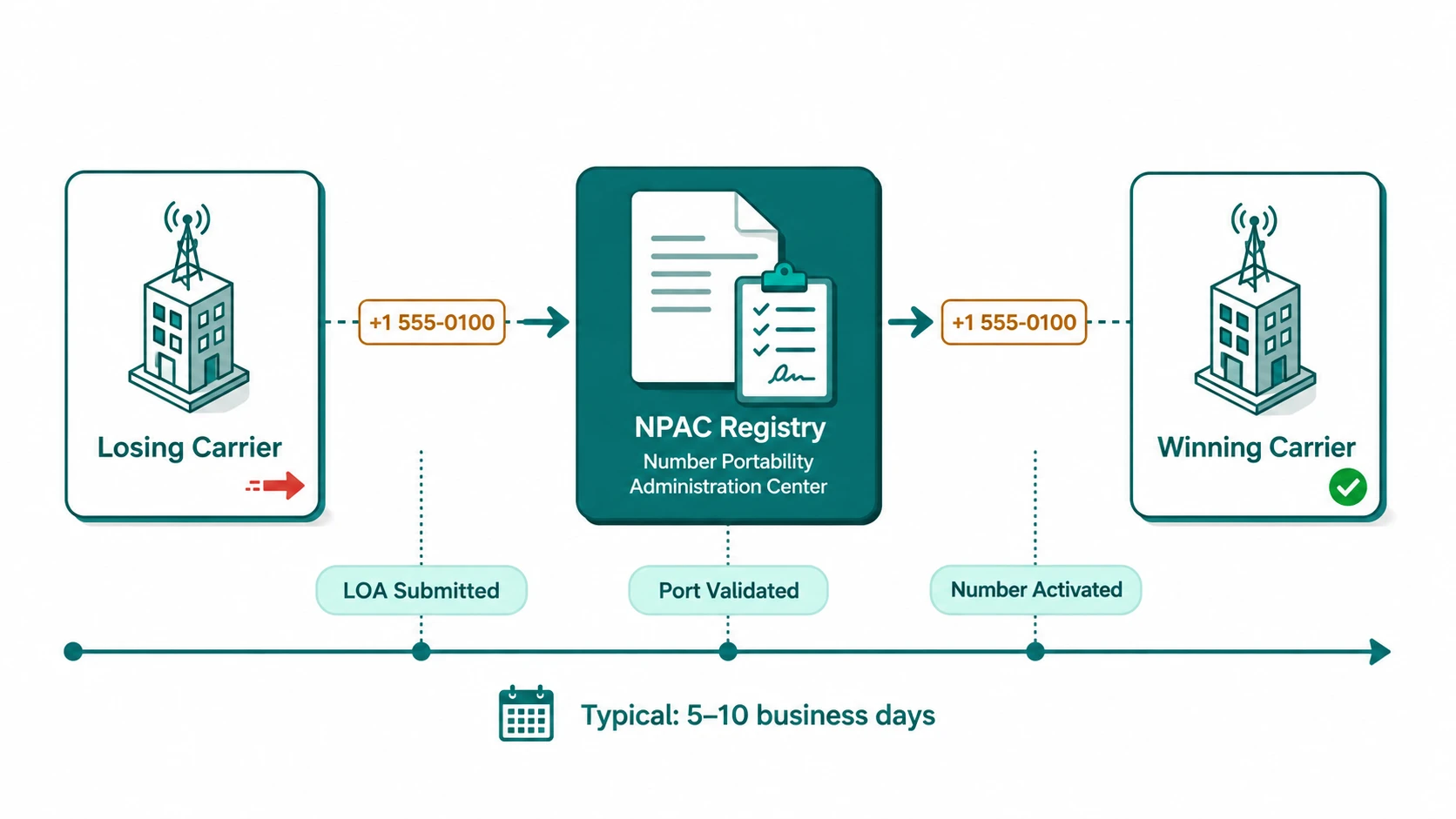
Number Porting (LNP): Local Number Portability is the process of transferring a telephone number from one service provider (the losing carrier) to another (the winning carrier) while keeping the number itself unchanged. The transfer is coordinated through the NPAC (Number Portability Administration Center), a national database that tracks which provider currently serves each ported number and routes calls accordingly.
How the Porting Process Works
The mechanics of a port involve several parties and a defined sequence of steps. Understanding who is responsible for what at each stage helps you know where to follow up when things slow down.
Step 1: Submit a Port Request to Your New Provider
The process is initiated with your new provider — the winning carrier. You will be asked to provide information that matches your current carrier's account records exactly: the phone number(s) to be ported, your account number with the current carrier, the billing name and address on the account, and in some cases a PIN or last four digits of a business identifier. Your new provider will also ask you to sign a Letter of Authorization (LOA) — a legal document authorizing them to request the number transfer on your behalf.
The LOA is a critical document. It must be signed by an authorized account holder, and the information it contains must match what your current carrier has on file. A mismatch in account number, business name, or address is the most common cause of port rejections and delays.
Step 2: The Winning Carrier Submits to NPAC and the Losing Carrier
With the LOA in hand, your new provider submits a port request to the NPAC and simultaneously notifies your current carrier (the losing carrier). The NPAC — operated by iconectiv and often referred to by its legacy name Telcordia — maintains the authoritative database of which provider serves which number.
The losing carrier then has an obligation to verify that the number belongs to the account described in the LOA. If everything matches, the losing carrier accepts the port order.
Step 3: FOC Date Is Confirmed
Once the losing carrier accepts the port, a Firm Order Commitment (FOC) date and time is confirmed. This is the scheduled moment when the number transfer will complete. For standard US local numbers, the FOC date is typically set 3–10 business days from when the losing carrier accepts the request. The actual timeline varies by carrier pair — some carriers process ports more quickly than others.
Step 4: Port Completes at FOC Date and Time
At the FOC date and time, the NPAC updates its routing records to point the number at your new provider. From that moment, calls to your number route to your new phone system. The cutover typically takes a few seconds to a few minutes to propagate across carriers. Your old carrier's service for that number terminates at this point.
Most providers recommend scheduling the FOC time during off-peak hours — mid-morning on a weekday — so any brief transition window does not affect your busiest calling periods.
What Causes Port Delays and Rejections
The majority of port delays trace back to a small set of recurring issues:
- Mismatched account information — the single most common cause of port rejections. The name, address, or account number on the LOA does not exactly match what the losing carrier has on file. Even minor discrepancies — "Company LLC" vs. "Company, LLC" — can trigger a rejection. Before submitting a port, request your account details from your current carrier to verify the exact information they hold.
- Numbers under contract lock — some carriers implement a contractual lock on numbers for customers in a fixed-term agreement. Early termination may be required before porting is possible, or the port may need to wait until the contract period expires. Check your current service agreement.
- Account-level service issues — accounts with billing disputes, past-due balances, or pending service changes may face holds that delay port acceptance. Resolving any open account issues before initiating a port request reduces this risk.
- BTN complexity — the Billing Telephone Number (BTN) is the primary number associated with an account, and porting multiple numbers from the same account may require the BTN to be ported last or handled separately. Your new provider should guide you through this if it applies.
- Toll-free numbers — toll-free portability uses a different system (the SMS/800 database via a Responsible Organization / RespOrg), and the process differs from local number porting. Allow additional time and confirm the process with your provider.
Information You Need Before Initiating a Port
Gathering this information before you start a port request significantly reduces the chance of rejection:
| Information item | Where to find it | Why it matters |
|---|---|---|
| Account number | Phone bill or carrier portal | Must match losing carrier's records exactly |
| Billing name | Phone bill header | Exact legal name as it appears on the account |
| Service address | Phone bill | Used to verify account ownership |
| PIN or passcode | Carrier account settings or customer service | Required by some carriers for port authorization |
| Billing Telephone Number (BTN) | Your primary number on the account | Required when porting multiple numbers from an account |
Keeping Service Continuity During the Port
One concern businesses often raise is whether calls will be missed during the cutover window. In practice, the actual transition at the FOC time is very brief — typically seconds to a few minutes for NPAC updates to propagate — and most carriers coordinate to minimize any gap. However, a few practices help ensure continuity:
- Set up your new phone system fully — including IVR menus, call routing, and voicemail — before the FOC date so it is ready to handle calls the moment the port completes.
- Schedule the FOC during low-volume hours rather than Monday morning or the pre-lunch peak.
- Have a contact at your new provider available on FOC day in case any technical issues need immediate resolution.
- Do not cancel your old service before the FOC date is confirmed complete — some businesses prematurely terminate service, which can complicate the process.
Virtual and VoIP Numbers: What Can Be Ported
Most telephone numbers assigned to a physical address or business account on US carriers can be ported. However, some number types have limitations:
- Numbers that are not currently active and assigned on the losing carrier's account generally cannot be ported.
- International numbers operate under each country's own portability rules, which vary significantly. LNP is not universal — many countries have their own frameworks, timelines, and coverage limitations. Consult your provider for specific country requirements.
- Some VoIP virtual numbers may have porting restrictions depending on how they were originally provisioned. Confirm portability with your current provider before planning a switch.
For more on how virtual numbers work and their provisioning differences from traditional numbers, see what is a virtual phone number and what is a DID number.
Porting to a VoIP or cloud phone system
Most businesses porting today are moving from a traditional phone carrier or on-premises PBX to a cloud VoIP platform. The LNP process itself — LOA, losing carrier, NPAC, FOC — is the same regardless of where the number is going. What changes is how the receiving end works, and a few practical differences are worth understanding before you initiate the port.
In a VoIP system, your ported number becomes a DID (Direct Inward Dialing) number provisioned on the platform's SIP infrastructure. The number is mapped to a routing destination — an extension, a ring group, an IVR, or a call queue — within the cloud system. This means your number configuration and your routing configuration are separate: the port brings the number over, but you still need to set up where calls to that number should go within the new system. Getting the routing configuration ready before the FOC date ensures calls land correctly the moment the port completes. For background on how DIDs work within a VoIP infrastructure, see what is a DID number.
A practical note specific to SIP trunking deployments: if you are porting numbers into a SIP trunk rather than a hosted cloud PBX, your on-premises system (Asterisk, FreeSWITCH, or a hardware PBX) needs to be configured to receive and route calls for the ported DID before the FOC date. This requires both the SIP trunk configuration on the carrier side and the inbound route configuration on the PBX side. The SIP trunking guide covers how inbound call routing works at the SIP layer. Unlike a hosted system where the provider handles the SIP infrastructure, a self-managed SIP trunk means a misconfigured inbound route at FOC time means missed calls until the configuration is corrected.
One other difference from porting between traditional carriers: VoIP providers provision numbers using their own SIP infrastructure, which means emergency services (E911) registration for ported numbers is your responsibility to confirm after the port completes. The number needs to be registered with a physical address in the platform's E911 system for emergency calls to route correctly. This step is sometimes overlooked when moving from a carrier who handled E911 automatically.